CxEmerge

CxEmergeCommissioning. Connected. Complete.

Every asset. Every test level.
One live record.

Commissioning software for data centres and MEP projects. The asset register, test scripts, results, sign-offs, issues and handover, shared by the client, the consultant and every vendor on site.

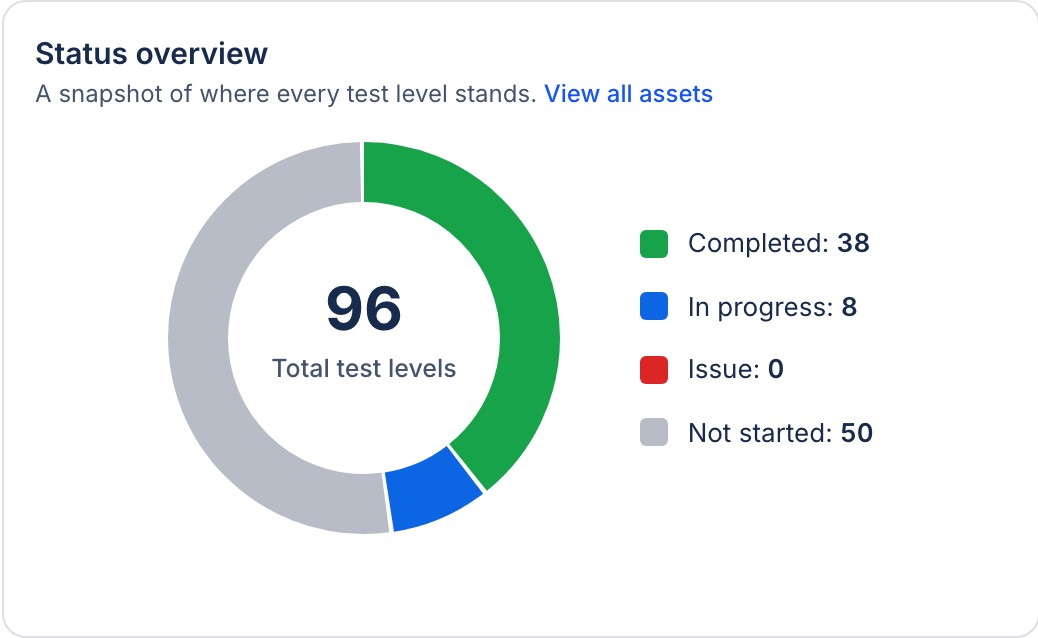
The dashboard of a sample project: readiness, critical assets at risk, open issues, overdue and in-progress levels, and the status overview
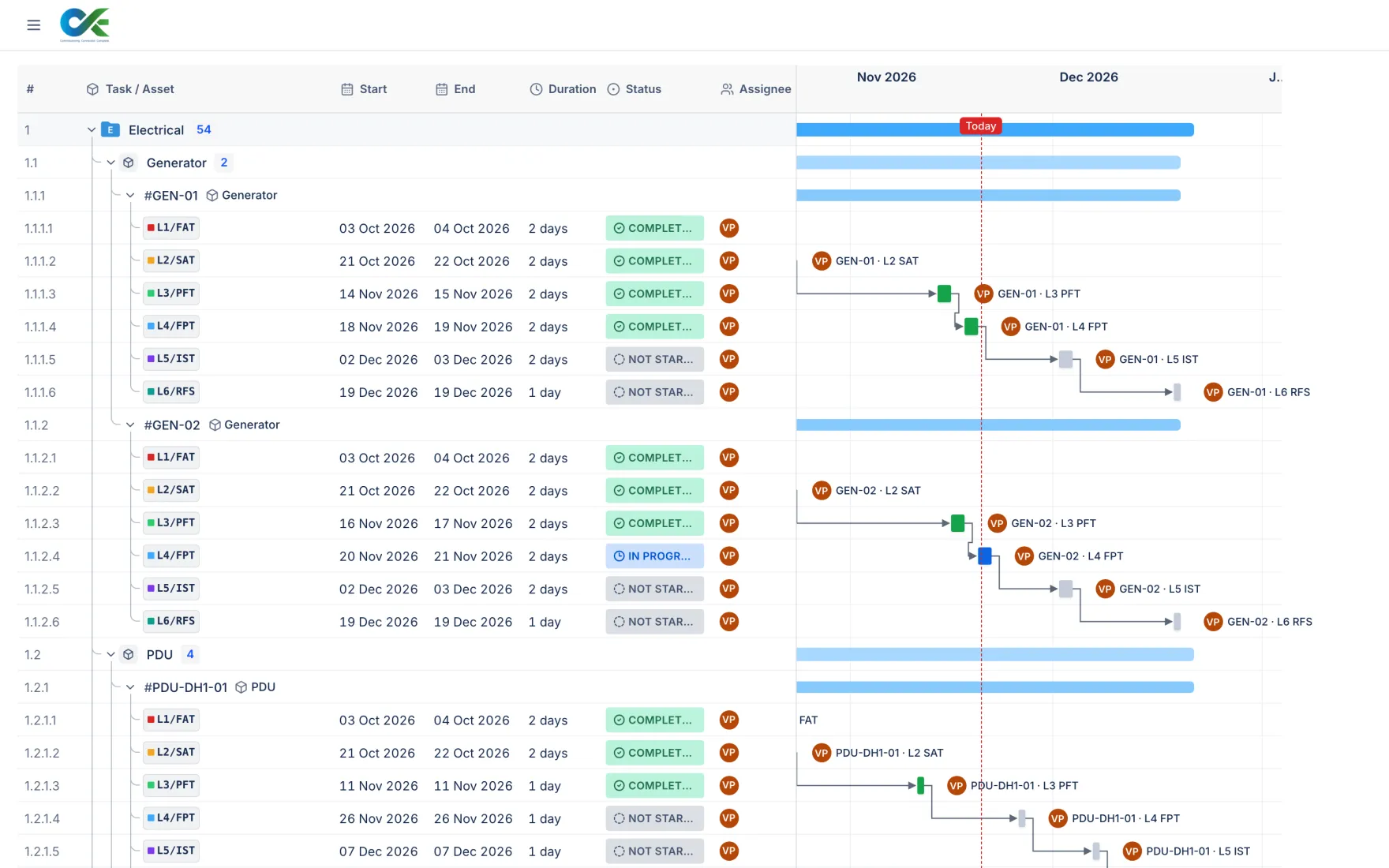
The scheduler on a tablet: every level on a timeline, month by month
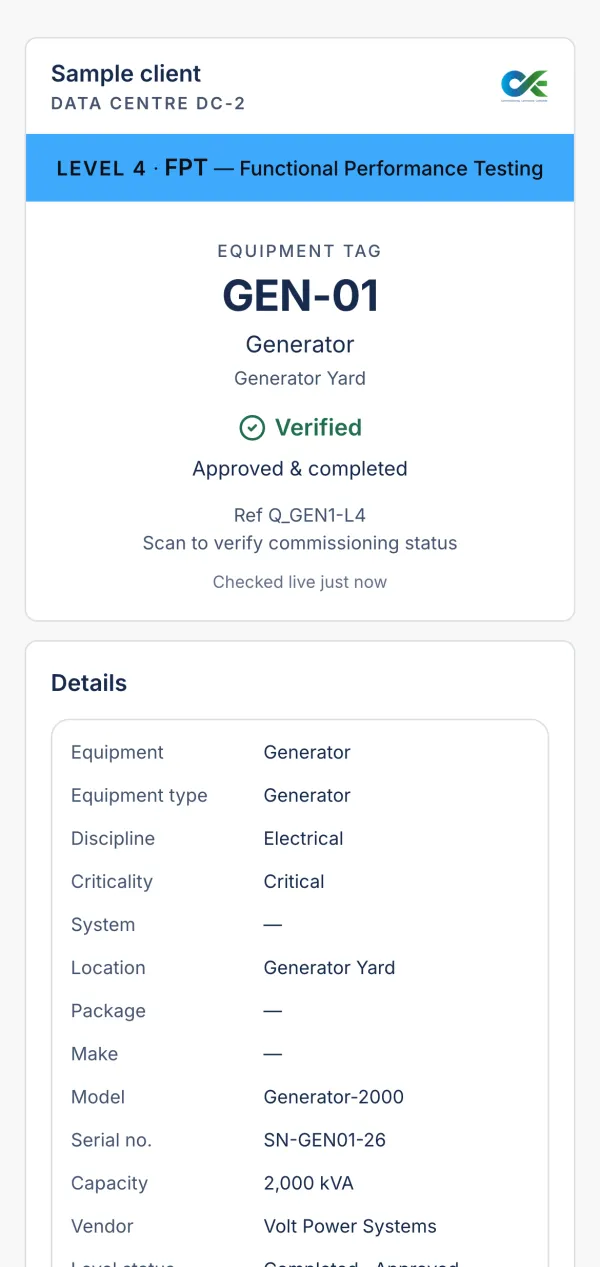
A scanned equipment tag on a phone: GEN-01 generator, Level 4, verified
app.cxemerge.com
The asset register in the app: chillers and CRAH units, each with its six test levels, criticality, status, vendor, dates and test script
Dashboard
Status overview: 96 test levels, 38 completed, 8 in progress, 50 not started
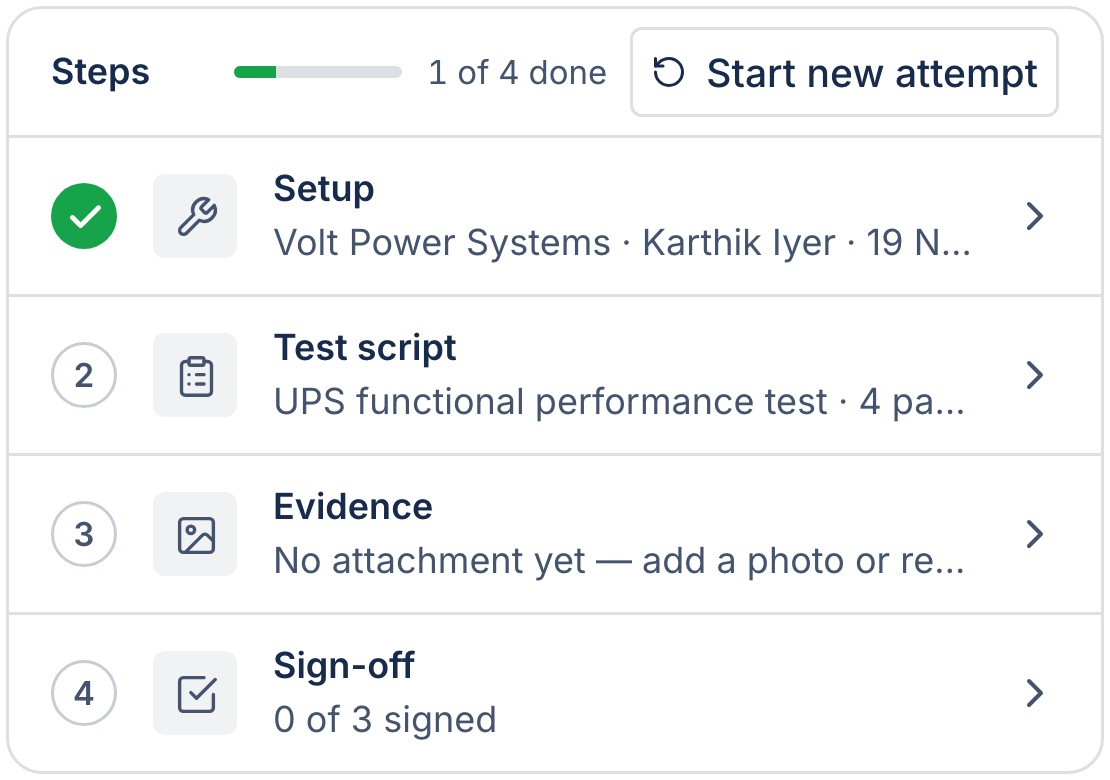
UPS-01 · L4 FPT
A level's four steps: setup, test script, evidence and sign-off

No more paperwork

One record, from the first plan to handover.

See the product
  1. 01 Plan Before site

    Build the asset register, attach the test scripts and schedule every level by vendor.

  2. 02 Test On site

    Record results and photos on a phone, step by step, and sign off level by level.

  3. 03 Resolve Issues and punch

    Raise issues where they're found. The vendor responds; the consultant closes.

  4. 04 Hand over Handover

    Issue QR tags for signed levels, then the turnover package with what is still missing.

The product

One record for the whole commissioning team

Every asset with its levels, criticality, status, vendor and dates. Group, sort and filter any column; import from Excel and export to Excel or PDF.

Generate a script from the asset, the level and the standard you name, or from your own procedure. You review every step, and nothing changes until a person confirms it.

A signed level gets its QR tag; scanning it shows the live status. Record results and photos on a phone, with or without a signal.

Every level on one timeline, by discipline, asset and vendor. Today is marked and a late level shows at once. Drag to reschedule.

Raised on the asset and level, with photos numbered to the issue. The vendor responds; the consultant closes, rejects or reopens.

The asset register, grouped by equipment type: chillers and CRAH units, level by level, with criticality, status, vendor and dates
A test script drafted for review: its overview, the checks before starting and the steps, with a box to ask for changes
A generator's Level 4 record: its steps done, the QR tag issued and the notes from site
The scheduler: generators and PDUs, level by level on a timeline, with today marked
Open issues grouped by equipment type, with level, priority, status and vendor

Everything else in the box

  • DashboardWhere every test level stands, at a glance, by discipline and vendor.
  • Turnover packageA PDF and a ZIP per package: records, tags, documents and what is still missing.
  • Audit logEvery change written as it happens and kept. Undo a wrong one from its entry.
  • Email reportsProject, issue and progress reports that send themselves, in the project's time zone.
  • DocumentsDrawings, procedures and reports in one place, by discipline, with versions.
  • MeetingsMinutes with actions that carry an owner and a date, followed up until closed.
  • PermissionsThe Project Admin decides who does what, person by person and company by company.
  • Imports and exportsExcel in; Excel and PDF out; the whole project, files and history, as one ZIP.

Connects

Fits the way your site already works

Bring the register in from Excel, send reports by email, print QR tags for the equipment, let your staff sign in with Microsoft, and keep working on a phone where there's no signal.

  • Excel
  • PDF
  • Email
  • Microsoft
  • QR tags
  • Phones
  • Offline
  • AI
  • Calendar
  • Photos
  • Signatures

On site

Scan the tag, see the status

  1. A tag on the equipmentEach signed level gets its own QR tag, printed and fixed to the unit.
  2. Scan it with a phoneIt opens in the phone's browser. There is no app to install.
  3. See the live statusThe level, the asset, who signed it and when.

Support

Help from people who know commissioning

Email support from our team, hands-on set-up for your first project, and guidance whenever your site needs it.

Security

Your record, kept safe

Hosted in India on Microsoft Azure, encrypted, backed up automatically and kept apart company by company. Every change stays in an audit log.

How your record is protected

  • Hosted in IndiaServers, database and files on Microsoft Azure, Central India.
  • EncryptedIn transit and at rest, with keys managed by Microsoft Azure.
  • Backed upAutomatic database backups, with restore to any point in the last 14 days.
  • Two-step sign-inA 6-digit code by email after the password, switched on for a project or a person.
  • Sign in with MicrosoftYour staff use their company account, with your company's own MFA. Enterprise.
  • Audit logEvery change recorded with who and when. Entries can't be edited or deleted.
  • Separated by companyVendors see and work on their own equipment only. The Project Admin decides the rest.
  • Export any timeEvery register, file and the history as one ZIP, whenever you ask.

EmergeAI

EmergeAI answers, plans and drafts. People decide.

Built into CxEmerge. It answers, plans and drafts from what you tell it. Nothing changes until a person confirms it, and every change is kept in the audit log.
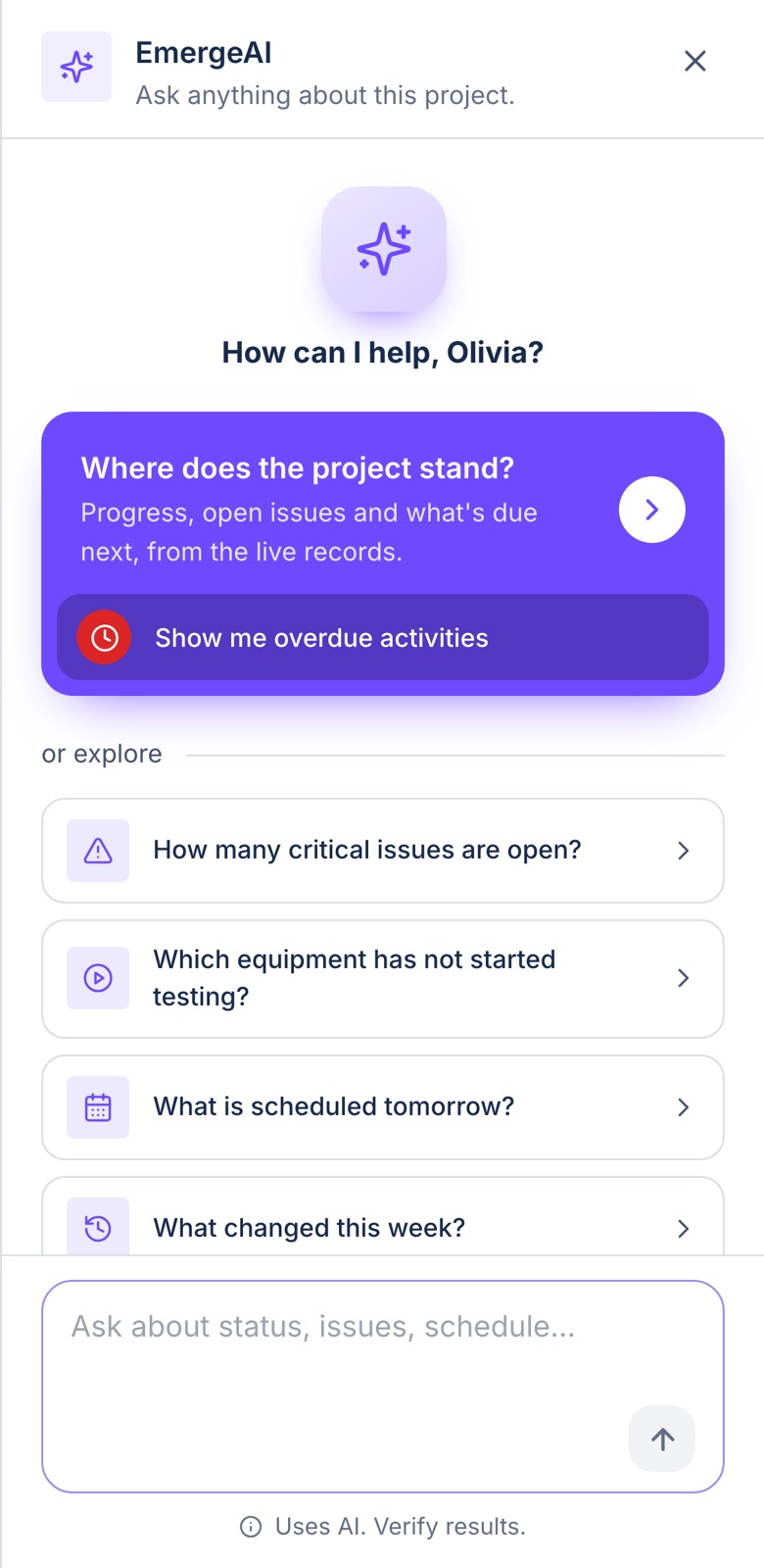
EmergeAI on a phone: How can I help? Where does the project stand, overdue activities, open critical issues, what is scheduled tomorrow, what changed this week
Ask EmergeAI

Ask about the project in plain words: what is late, what is open, who signed, where a tag stands.

Scheduling

Plans the levels and reschedules around a delay. It proposes the changes; you confirm them.

Scripts and checklists

Drafts from the asset, the level and the standard you name, or from your own procedure.

Issues and the audit log

Suggests who to assign and when it is due, and searches every change made to the record.

Plans

Priced per project, sized to your programme

Tell us about your project and we'll send a quote. Any Advanced module can be added to Essential on its own.

Essential For a project getting started Any Advanced module can be added on its own.
  • Asset register and L1 to L6 levels
  • Test scripts, results, evidence and sign-off
  • Issues, punch list and inspections
  • Scheduler, tags and QR scan
  • Documents and meetings
  • Phones and offline
Ask for a quote
AdvancedRecommended Everything in Essential, plus The modules most projects add.
  • Audit log with undo
  • EmergeAI: the assistant and AI test scripts
  • Turnover package
  • Email reports and automation
Ask for a quote
Enterprise Everything in Advanced, plus For programmes of several projects.
  • Sign in with Microsoft for your staff
  • Limits set for your programme
  • One contract across your projects
  • Priority support
Talk to us

FAQ

Answers to what teams ask first

Can vendors without a company email use it?

Yes. The Project Admin invites them by any email address, and they sign in with a password. Each vendor sees and works on its own equipment only.

Does it work without a signal?

Yes. With offline mode on, field work carries on in the plant room or the basement and is sent when the phone is back online.

Where is our data kept?

In India, on Microsoft Azure (Central India), encrypted in transit and at rest, with automatic backups and point-in-time restore.

Can we take our data with us?

Yes. Every register exports to Excel and PDF, and the Project Admin can export the whole project, files and history included, as one ZIP at any time.

Do we have to use your test scripts?

No. Bring your own procedures, start from the library, or have the AI draft a script from your document for you to review and edit.

How long does it take to set up a project?

A project with its register imported from Excel can be ready the same day. We walk your Project Admin through the first one.

Still have a question?

Can't find the answer here? Send us an email and we'll get back to you.

Send an email

See CxEmerge
on your own project

Tell us its size, the disciplines and the levels you test. We'll set up a walkthrough with a sample project like yours.

Or write to sales@cxemerge.com